Evidence that your code changes were checked
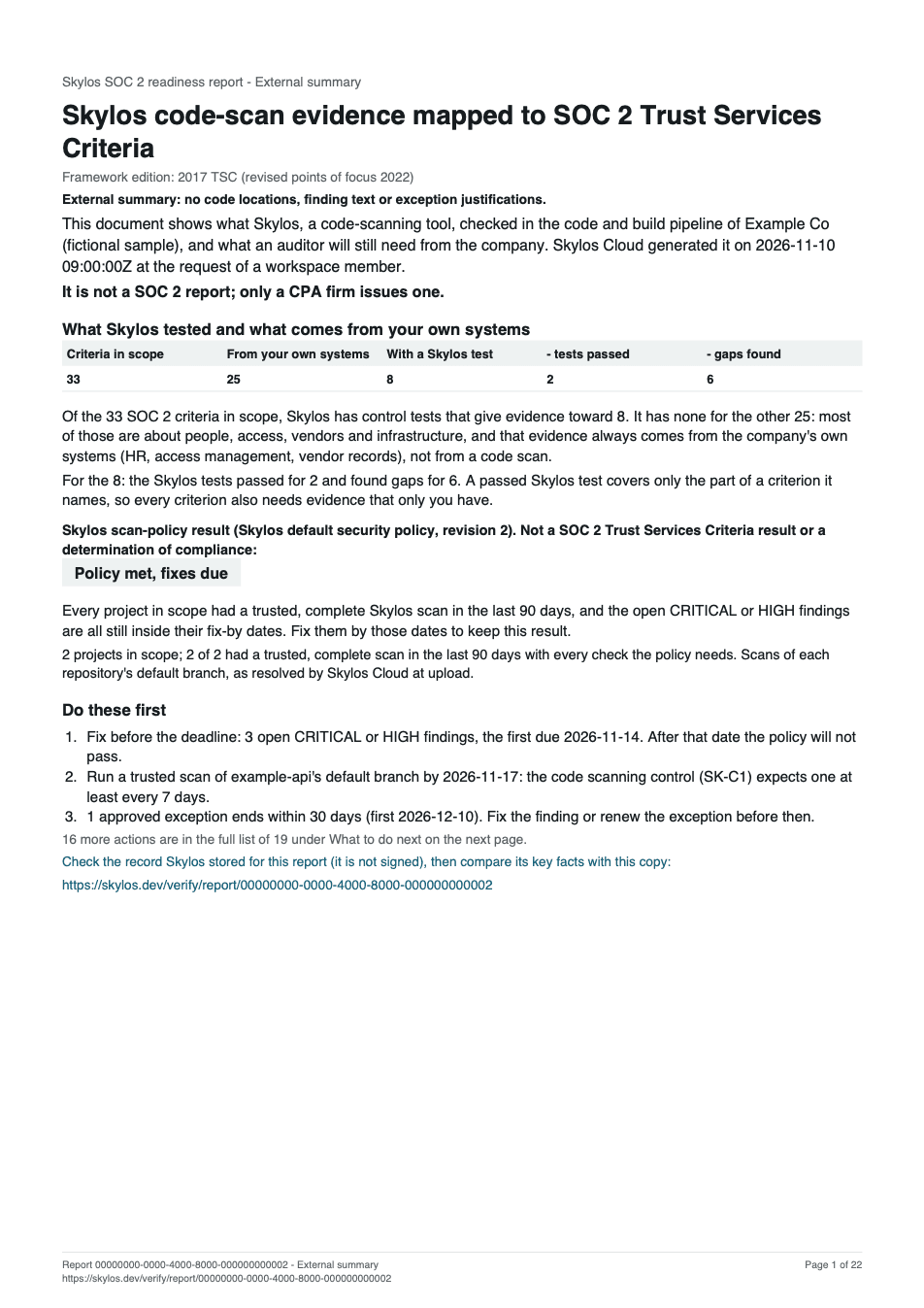
An auditor or a customer's security questionnaire asks how you scan code and what you do with the findings. Skylos Cloud turns the scans your CI already runs into a signed report, mapped to SOC 2, ISO 27001 and other framework criteria. It is evidence for an assessor, not a certificate.
Reports generated in Skylos Cloud are signed, and the verification page says so for each one. The published sample is generated outside Skylos Cloud: it is not signed, and says so on page 1.
Your first workspace gets a Workspace trial: 14 days, 50 credits, no card, nothing renews or charges you.
What you receive
One stored report per framework and project selection. It counts a project when the project has a trusted scan from the last 90 days, uploaded from CI or run by Skylos Cloud, that covered the whole repository with the security, secret and dependency checks.
- The report
- JSON, CSV, HTML, PDF, SARIF, all from the same stored report. The full edition stays inside your team: it has file paths and finding text. The external edition (HTML, PDF or CSV) is for an auditor or customer and shows counts in place of findings.
- Every requirement, with a status
- Each requirement of the framework edition is listed, including the ones a code scan cannot evidence. Findings carry the date they were found and a fix-by date. Accepted risks are listed with who approved them and when they end.
- A public verification link
- Each report prints a link to
skylos.dev/verify/report/<id>. The page says whether Skylos signed the report and whether the record Skylos stores is unchanged. It checks that stored record, not the PDF or CSV in your auditor's hand; the JSON download is the signed original to compare a copy against. It never shows your organization, repositories or findings. - SOC 2 pre-assessment
- A SOC 2 report adds a section with a system description, 6 control tests with the population and the result, deviations, and a table per criterion of what the tests show. Skylos pre-assessment, shaped like sections III to V of a SOC 2 Type 2 report. Skylos tested its own records; this is not an auditor's test, opinion or report.
- Evidence files per control
- The SOC 2 control tests come with the records they were run on, as 11 CSV files your auditor can sample from: merged_prs.csv, scan_checks.csv, weekly_scans.csv, scan_gaps.csv, findings.csv, cicd_findings.csv, secret_findings.csv, branch_settings.csv, dependency_coverage.csv, deviations.csv, readiness.csv. When the auditor picks pull requests, findings or exceptions to test, you get one evidence packet for exactly those items from the stored report, at no extra charge.
- Draft questionnaire answers
- From a SOC 2 report, draft answers to common customer questions about code scanning, fixing vulnerabilities and change review, each with the numbers from that report and a note on what you must add yourself. You check each one before you send it. On Vanta, Drata or Secureframe? See which file to upload where.
- Change history, audit log and access review
- On the Workspace, Growth and Enterprise plans: an export of every pull-request scan in a date range with the check result and who overrode a failed check and why, the workspace audit log, and a page that lists who can see and change the workspace.
The 6 controls a SOC 2 report tests
Skylos tests these against its own records over the report's audit period. Each test names its population and its result, such as "No deviations noted" or "Deviation noted: x of y".
- C1Code scanning on every pull request and on the default branch
- C2Vulnerability remediation within fix-by dates, including dependency advisories
- C3Change management: pull requests scanned, gated and approved before merge
- C4CI/CD pipeline hardening
- C5No hard-coded secrets on the default branch
- C6Dependency inventory
Which frameworks
A report maps your scans to the criteria of one framework edition. The mappings are Skylos's own.
From code scans
- OWASP Top 102025
- CWE Top 25 Most Dangerous Software Weaknesses2025
- PCI DSS4.0.1
- SOC 2 Trust Services Criteria2017 TSC (revised points of focus 2022)
- HIPAA Security Rule45 CFR Part 164, Subpart C
- ISO/IEC 270012022 (Annex A)
- NIST Secure Software Development FrameworkSP 800-218 v1.1
- EU Cyber Resilience ActRegulation (EU) 2024/2847
AI governance
- EU AI ActRegulation (EU) 2024/1689
- NIST AI Risk Management FrameworkAI RMF 1.0 (NIST AI 100-1)
- ISO/IEC 420012023 (Annex A)
What it costs
- One report
- 500 credits, charged once per framework and project selection. Every format downloads free afterwards. Checking which projects a report would count is free.
- Workspace plan
- $3,000 a year per workspace, with 1,000 credits included each year. That covers 2 reports a year. It also turns on the change history export, the audit log and the access review.
- Credits without a plan
- Every credit action works on every plan, Free included, when the workspace has the credits. The Team pack (1,000 credits, $129) covers 2 reports.
What it is not
- Not a certificate or an audit
- Skylos does not certify or audit you. A qualified assessor, such as a SOC 2 auditor or an ISO 27001 certification body, decides whether you meet a framework. The report is evidence you hand to them.
- Not a replacement for your auditor, Vanta or Drata
- Skylos covers one part of the evidence: what code scans found, when, and what was done about it. Policies, people, devices, vendors and infrastructure need evidence from somewhere else.
- Not proof that the code is secure
- No open findings is not the same as no vulnerabilities. A code scan does not see business logic, runtime behaviour or deployed configuration.
- Not most of a framework
- Most requirements in each framework are about process, people and infrastructure. The report lists them all and marks those rows "Not evidenced by static analysis", with the reason.
What the change-history export does not record
The change-history export says this about itself in the product:
- This export lists scans, not merges, so it shows what the check found, not what shipped. Deployments are not recorded anywhere in Skylos.
- This export does not list pull-request reviews. It lists only approvals given in Skylos.
- Changes pushed without a pull request, or never scanned, are not included.
The SOC 2 report records more than the change-history export. For GitHub repositories connected through the Skylos GitHub App, it lists each merged pull request with its approvals by people other than the author (test SK-C3.3); bots are not counted. Reviews on GitLab are not recorded.
Skylos itself holds no SOC 2 or ISO 27001 certification. Single sign-on (SAML) is part of the Growth and Enterprise plans and is set up on request. Open the trust center lists every control and every gap.
Start with one repository
Connect a repository, let CI upload a scan, and check for free which projects a report would count. You pay credits when you generate.
Questions about the report or your audit? Ask us at founder@skylos.dev.